
Cloud Migration Services in 2026: Trends, Best Practices & Business Benefits
Moving to the cloud is no longer just an IT upgrade. For many businesses, it's a way to grow faster, reduce infrastructure costs, improve security, and prepare for AI-driven applications.
Introduction
Moving to the cloud is no longer just an IT upgrade. For many businesses, it's a way to grow faster, reduce infrastructure costs, improve security, and prepare for AI-driven applications.
A few years ago, most companies focused on one goal: move their servers to the cloud as quickly as possible. Today, that approach doesn't work for everyone.
Businesses now ask different questions:
- How can we reduce our cloud bill?
- Which cloud platform is right for us?
- Can we migrate without downtime?
- How do we keep customer data secure?
- Will our applications be ready for AI?
These questions have changed the way companies approach cloud migration services.
Whether you're running an eCommerce platform, a SaaS product, a manufacturing company, or a healthcare business, your migration strategy now affects everything from customer experience to operating costs.
Why More Businesses Are Investing in Cloud Migration Services
Imagine your business has grown over the last five years. Your website gets more visitors. Your employees work remotely. Customers expect faster applications. Your team wants to use AI tools.
If your servers are still running on old infrastructure, you'll eventually face problems such as:
- Slow application performance
- Higher maintenance costs
- Security risks
- Limited scalability
- Expensive hardware upgrades
This is where cloud migration services help.
Instead of investing in new physical servers every few years, businesses move their applications, databases, and workloads to cloud platforms where resources can grow with demand.
For example, an online shopping website may receive 5,000 visitors on a normal day but over 100,000 visitors during a festive sale. Cloud infrastructure can automatically increase computing resources during peak traffic and reduce them afterward, helping businesses maintain performance while controlling costs.
Many organizations also combine cloud migration services with managed cloud services to monitor infrastructure, improve uptime, and optimize costs after migration.
Trend 1: AI Is Making Cloud Migration Faster
Artificial intelligence isn't replacing cloud engineers, but it is helping them make better decisions.
Earlier, migration teams had to manually check which servers are connected, which applications depend on each other, which databases should move first, and what could break during migration. For large enterprises, this process could take weeks.
Today, AI-powered tools can automatically:
- Discover applications
- Map dependencies
- Identify security risks
- Estimate migration effort
- Suggest the best migration sequence
This helps businesses reduce manual work and avoid unexpected downtime.
Another growing trend is using AI after migration. Instead of waiting for users to report slow applications, AI-based monitoring tools can detect unusual behavior, identify performance bottlenecks, and recommend fixes before customers notice a problem.
That's one reason many organizations are investing in managed cloud services after migration instead of treating migration as a one-time project.
Businesses planning AI-powered applications should also think beyond migration. Building AI-ready infrastructure often requires scalable storage, GPU-enabled environments, and modern application architectures. Learn more about AI development services and how cloud infrastructure supports AI workloads.
Trend 2: Companies Are Modernizing Applications Instead of Simply Moving Them
One of the biggest mistakes businesses made in the past was moving old applications to the cloud without improving them.
This approach, often called lift-and-shift, is quick but doesn't always deliver better performance or lower costs.
Today, businesses are focusing on cloud modernization. Instead of copying old systems, they redesign applications using technologies such as:
- Containers
- Kubernetes
- Microservices
- Serverless computing
- APIs
Let's take a simple example. Imagine an online food delivery app. If one feature, such as payment processing, receives heavy traffic, the entire application shouldn't need extra servers. With a microservices architecture, only the payment service scales when demand increases.
This makes applications:
- Faster
- Easier to update
- More reliable
- Less expensive to operate
Many organizations combine modernization with DevOps & automation services to automate deployments, testing, and infrastructure management.
Trend 3: Hybrid Cloud Is Becoming the First Choice for Enterprises
One common misconception is that every business should move everything to the public cloud. In reality, many organizations choose a hybrid cloud approach.
A hybrid cloud combines on-premises infrastructure with public cloud services.
For example, a hospital may keep patient records in a private environment to meet compliance requirements while hosting its appointment booking system in the public cloud.
Similarly, manufacturers often keep production systems on-site while using cloud platforms for analytics and reporting.
This approach offers several benefits:
- Better security for sensitive data
- Easier compliance with regulations
- Lower migration risks
- Improved disaster recovery
- Greater flexibility as the business grows
Choosing between public cloud, private cloud, hybrid cloud, or multi-cloud depends on your applications, budget, and long-term goals — not on what's most popular.
Trend 4: Cloud Costs Are Rising — FinOps Is Helping Businesses Stay in Control
One of the biggest surprises businesses face after moving to the cloud is the monthly bill.
Cloud platforms follow a pay-as-you-go model, which is great for flexibility. But if resources aren't managed properly, costs can increase much faster than expected. Unused virtual machines, oversized databases, idle storage, and poor scaling policies often lead to unnecessary spending.
This is why FinOps (Financial Operations) has become one of the biggest cloud trends in 2026.
FinOps is not a tool. It's a way for finance, engineering, and operations teams to work together and make smarter decisions about cloud spending.
For example, a SaaS company may discover that several test servers continue running overnight and during weekends. By automatically shutting them down when they aren't needed, the company can reduce monthly cloud costs without affecting development.
Businesses also use FinOps to:
- Track cloud spending in real time
- Identify unused resources
- Forecast future cloud budgets
- Improve resource utilization
- Reduce cloud waste
Many organizations combine cloud migration services with cloud cost optimization services to ensure they continue saving money even after migration is complete.
If your business is planning a migration, don't think only about moving workloads. Plan how you'll manage costs over the next three to five years.
Our cloud services include cloud cost assessment, migration planning, and long-term infrastructure optimization to help businesses control cloud spending.
Trend 5: Security Is No Longer an Afterthought
Moving to the cloud doesn't automatically make your business more secure.
Cloud providers secure the infrastructure, but protecting applications, user access, and business data remains your responsibility.
That's why companies now invest in secure cloud infrastructure services before migrating critical systems.
One security model that's becoming standard is Zero Trust.
Instead of assuming every user inside the network is trusted, Zero Trust verifies every login request, device, and application before granting access.
This usually includes:
- Multi-factor authentication (MFA)
- Identity and Access Management (IAM)
- Role-based permissions
- End-to-end encryption
- Continuous activity monitoring
Imagine an employee trying to access financial data from an unknown device in another country. Instead of allowing access immediately, the system requests additional verification or blocks the login until it's confirmed.
For industries such as healthcare, finance, and government, these security measures are essential to meet compliance requirements and reduce cyber risks.
Security planning should begin before migration — not after.
Trend 6: Businesses Are Choosing Multi-Cloud Instead of Relying on One Provider
A few years ago, most businesses selected one cloud provider and built everything there. Today, many organizations are adopting multi-cloud environments.
A multi-cloud strategy means using services from more than one cloud provider.
For example:
- AWS for application hosting
- Microsoft Azure for business applications
- Google Cloud for AI and analytics
This approach helps businesses:
- Avoid vendor lock-in
- Improve disaster recovery
- Increase availability
- Choose the best service for each workload
- Improve business continuity
However, managing multiple cloud platforms is also more complex. Businesses need consistent security policies, centralized monitoring, and automated infrastructure management.
This is where experienced cloud consulting services help organizations build a cloud architecture that remains simple to manage as it grows.
Hybrid Cloud vs. Multi-Cloud
| Hybrid Cloud | Multi-Cloud |
|---|---|
| Combines on-premises with cloud | Uses two or more cloud providers |
| Best for compliance-heavy industries | Best for avoiding vendor lock-in |
| Easier migration from legacy systems | Greater flexibility for global businesses |
| Lower operational complexity | Higher management complexity |
There isn't a single "best" option. The right choice depends on your applications, compliance needs, and business goals.
Trend 7: Cloud-Native Applications Are Becoming the Standard
Businesses no longer build applications the same way they did ten years ago.
Instead of creating one large application, developers now break software into smaller services that can be updated and scaled independently. This approach is called cloud-native development.
Technologies such as Docker and Kubernetes have made cloud-native applications easier to build and manage.
Some of the biggest benefits include:
- Faster software releases
- Better application performance
- Automatic scaling
- Higher availability
- Easier maintenance
Let's take a banking app as an example. If only the payment module experiences heavy traffic, Kubernetes can automatically scale that service without increasing resources for the entire application. This reduces infrastructure costs while improving user experience.
Businesses adopting cloud-native architecture also benefit from cloud infrastructure services that automate deployment, monitoring, backups, and recovery.
To get the most from cloud-native development, many companies combine migration projects with DevOps & automation services. Automating deployments, infrastructure provisioning, and testing helps teams release updates more quickly while reducing manual errors.
Before You Start Your Cloud Migration
Many businesses focus on selecting AWS, Azure, or Google Cloud, but the provider is only one part of the decision.
Ask these questions first:
- Which applications should move first?
- Can some workloads stay on-premises?
- How much downtime can the business tolerate?
- Are security and compliance requirements documented?
- Who will monitor and optimize the cloud after migration?
Answering these questions early helps avoid costly changes later.
Trend 8: AI Workloads Are Changing How Businesses Plan Their Cloud Infrastructure
Artificial Intelligence is no longer limited to large tech companies. Today, manufacturers use AI to predict machine failures, retailers use it for product recommendations, and healthcare providers use it to analyze medical data.
Running these AI applications requires a different type of cloud infrastructure.
Unlike traditional business software, AI models need:
- High-performance GPUs
- Fast storage
- Scalable computing
- Large datasets
- Reliable networking
This is one reason many businesses are upgrading their existing cloud environments instead of simply increasing server capacity.
For example, a logistics company using AI to optimize delivery routes processes thousands of data points every minute. If the infrastructure can't scale during peak hours, the application becomes slow and results are delayed.
Modern cloud infrastructure services help businesses build environments that support AI without overpaying for resources they don't always need.
If your company plans to introduce AI in the next few years, it's worth designing your cloud environment with future workloads in mind rather than rebuilding everything later.
Businesses looking to combine AI with scalable cloud infrastructure can also explore our AI development services to build intelligent applications that run efficiently in modern cloud environments.
Trend 9: Sustainable Cloud Computing Is Becoming a Business Priority
Sustainability is becoming an important factor in technology decisions.
Many organizations now include environmental goals in their IT strategy, and cloud computing plays a significant role.
Instead of running underutilized physical servers in their own data centers, businesses can take advantage of cloud platforms that optimize energy usage and improve hardware utilization.
Leading cloud providers continue investing in renewable energy, efficient cooling systems, and carbon reduction initiatives. While these efforts are managed by the providers, businesses also contribute by designing efficient applications and removing unused resources.
Simple actions such as:
- Deleting idle virtual machines
- Using auto-scaling
- Archiving old data
- Optimizing storage
- Monitoring resource usage
can reduce both cloud costs and unnecessary energy consumption.
This makes sustainable cloud practices good for both business and the environment.
Trend 10: Cloud Migration Doesn't End After Go-Live
Many businesses think the migration project is complete once applications are running in the cloud.
In reality, that's where the long-term work begins.
Cloud environments need continuous monitoring, regular security updates, performance tuning, backup testing, and cost optimization.
Without ongoing management, businesses often experience:
- Increasing cloud bills
- Performance issues
- Security vulnerabilities
- Unused resources
- Configuration errors
That's why organizations increasingly rely on managed cloud services after migration.
Regular monitoring helps teams identify issues before they affect customers and ensures cloud resources continue to match business requirements.
Combining managed cloud services with cloud migration services gives businesses long-term value instead of treating migration as a one-time project.
AWS vs Azure vs Google Cloud: Which One Should You Choose?
There isn't a single cloud platform that's best for every business. The right choice depends on your applications, budget, compliance needs, and future plans.
| Feature | AWS | Microsoft Azure | Google Cloud |
|---|---|---|---|
| Best For | Large enterprises and startups | Microsoft-based businesses | AI, analytics, and data-driven applications |
| Global Infrastructure | Excellent | Excellent | Very Good |
| AI & Machine Learning | Strong | Strong | Excellent |
| Hybrid Cloud | Good | Excellent | Good |
| Pricing | Pay-as-you-go | Flexible | Competitive |
| Ecosystem | Largest service portfolio | Strong Microsoft integration | Strong data and AI tools |
A cloud consulting services partner can help evaluate your existing infrastructure and recommend the platform or combination of platforms that best fits your business.
Common Cloud Migration Mistakes to Avoid
Even well-planned projects can run into problems if important steps are skipped.
Some of the most common mistakes include:
- Moving every application without assessing business value
- Ignoring cloud security until after migration
- Choosing a cloud provider based only on price
- Migrating without a backup or rollback plan
- Forgetting to train internal teams
- Not monitoring cloud costs after migration
- Skipping application performance testing
- Underestimating network and data transfer requirements
Avoiding these mistakes early can save weeks of rework and reduce unexpected costs.
Quick Cloud Migration Checklist
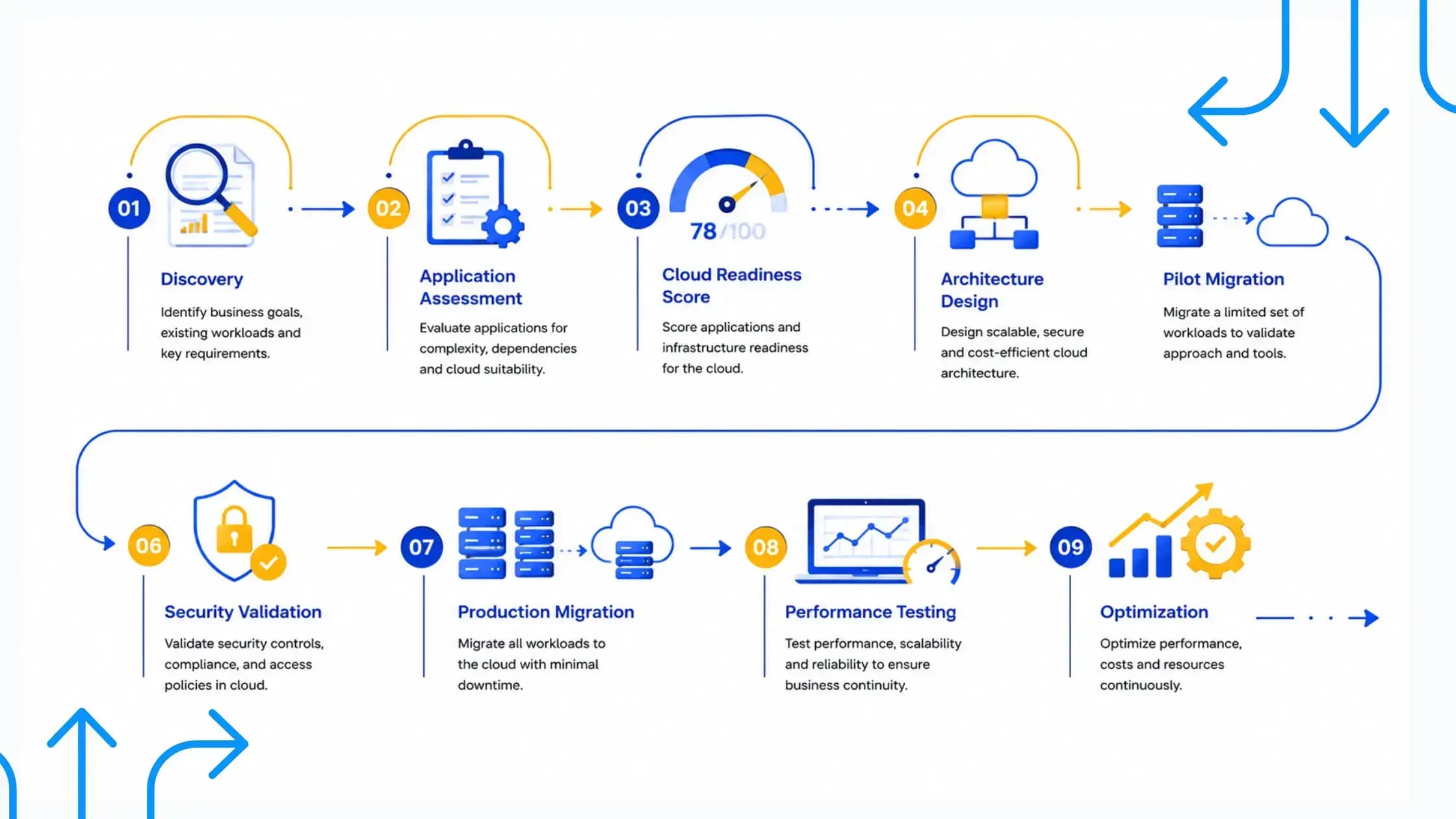
Before starting your migration project, make sure you have:
- Identified the applications to migrate
- Reviewed security and compliance requirements
- Selected the right cloud platform
- Planned backup and disaster recovery
- Estimated migration costs
- Tested applications before going live
- Created a rollback plan
- Set up monitoring and alerts
- Planned ongoing cloud optimization
Key Takeaways
Cloud migration in 2026 is about much more than moving servers.
Successful businesses are investing in:
- AI-assisted migration planning
- Application modernization
- Hybrid and multi-cloud strategies
- Strong security with Zero Trust
- FinOps for cloud cost optimization
- Cloud-native application development
- Continuous monitoring and managed cloud services
Most importantly, they treat cloud migration as an ongoing business strategy instead of a one-time IT project.
Whether you're moving a single application or modernizing your entire infrastructure, planning, security, and optimization should be part of every stage.
Ready to Start Your Cloud Migration Journey?
Moving to the cloud doesn't have to be complicated.
At Intellosoft, we help businesses assess their existing infrastructure, choose the right cloud strategy, migrate workloads securely, and optimize cloud environments for long-term performance.
Whether you're planning a new migration, modernizing legacy applications, or looking to reduce cloud costs, our team can help you build a solution that supports your business goals.