
DevOps Automation: Benefits, Tools & Best Practices
Software teams are expected to release new features faster while maintaining security, reliability, and performance. However, manual deployments, repetitive infrastructure configuration, inconsistent environments, and lengthy testing processes can make software delivery slow and error-prone.
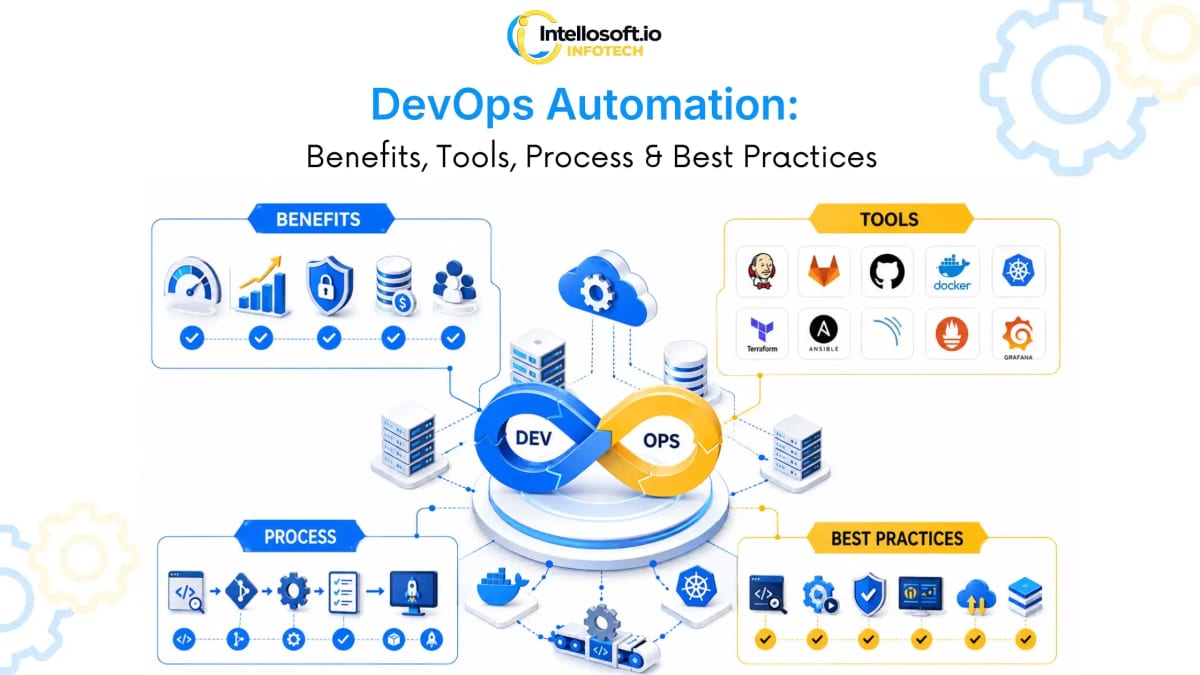
Introduction
This is where DevOps automation becomes essential.
DevOps automation uses tools, workflows, scripts, and policies to automate repetitive activities across the software development and IT operations lifecycle. It can automate code integration, testing, infrastructure provisioning, application deployment, security checks, monitoring, and incident response.
Instead of relying on engineers to manually execute the same deployment steps every time, automation creates a repeatable process that can run consistently across development, staging, and production environments.
Modern DevOps practices combine CI/CD, Infrastructure as Code (IaC), automated testing, containers, cloud platforms, observability, and DevSecOps to create a more reliable software delivery pipeline. In Next-gen systems, teams use CI/CD as a way to automate code integration, testing, and deployment, while Infrastructure as Code allows infrastructure to be managed through version-controlled definitions similar to application code.
What Is DevOps Automation?
DevOps automation is the use of tools and automated workflows to reduce manual effort across software development, deployment, infrastructure management, security, and operations.
A typical automated workflow starts when a developer commits code or creates a pull request. The DevOps pipeline can then automatically build the application, run tests, perform security checks, create deployment artifacts, deploy the application to a staging environment, and after required approvals release it to production.
The goal is not to automate everything blindly.
The goal is to automate repeatable, predictable, and measurable processes so engineering teams can spend more time solving complex problems instead of performing repetitive operational tasks.
Example: Without Automation vs. With Automation
Without automation, a deployment might involve manually pulling the latest code, installing dependencies, running tests manually, building the application, connecting to a server, updating application files, restarting services, checking logs, verifying application health, and rolling back manually if something fails.
With a properly designed CI/CD pipeline, all of these steps happen automatically within minutes, providing instant feedback and minimizing risk.
How Does DevOps Automation Work?
DevOps automation generally works as a connected workflow across development, testing, infrastructure, deployment, security, and monitoring.
- Code Commit: A developer pushes code to a version control repository such as GitHub, GitLab, or Bitbucket. This event automatically triggers a CI/CD pipeline.
- Automated Build: The pipeline builds the application and creates the required artifacts or container images. Build automation helps ensure that the same process is followed consistently for every release.
- Automated Testing: Automated tests verify whether the new code works as expected. Depending on the application, this can include unit, integration, API, regression, end-to-end, and performance testing.
- Automated Security Checks: Security checks can be integrated directly into the pipeline. This approach is commonly associated with DevSecOps, where security becomes part of the delivery process rather than a final-stage activity.
- Automated Deployment: After the required checks pass, the application can be automatically deployed to development, staging, or production environments using strategy options like canary or blue-green rollouts.
- Infrastructure Automation: Infrastructure is managed through code, allowing environments to be repeatable, versionable, and reviewable.
- Monitoring and Observability: After deployment, monitoring tools collect metrics about application and infrastructure health, sending alerts or triggering remediation workflows when failures are detected.
What DevOps Processes Can Be Automated?
DevOps automation covers multiple stages of the lifecycle:
1. Continuous Integration
Continuous Integration (CI) automatically validates code changes when developers commit or merge code. A CI pipeline builds the application, runs automated tests, performs code-quality checks, scans dependencies, and reports failures.
2. Continuous Delivery and Continuous Deployment
Continuous Delivery keeps software in a release-ready state after passing automated checks. Continuous Deployment takes automation further by automatically releasing validated changes to production, reducing deployment lag.
3. Automated Testing
Testing is one of the most valuable areas for automation, executing unit, integration, API, regression, UI, and performance tests for instant development feedback loops.
4. Infrastructure as Code
Infrastructure as Code (IaC) represents infrastructure configuration as code instead of relying entirely on manual cloud-console operations. This is especially useful for managing environments at scale.
5. Configuration Management
Configuration management automates the setup and maintenance of servers and applications, standardizing environment packages, setup, and security settings across systems.
6. Containerization and Orchestration
Containers package applications and dependencies into consistent runtime environments. Automation handles container builds, image scanning, deployment, scaling, health checks, and rollbacks.
7. Monitoring and Incident Response
Monitoring systems automatically detect service failures, high utilization, and error rates, triggering alerts or remediation workflows to close the operations feedback loop.
Benefits of DevOps Automation
A well-designed automation strategy improves both engineering efficiency and business outcomes. Key benefits include:
- Faster Software Releases: Automation reduces manual handoffs, allowing teams to release features frequently without increasing operational workload.
- Fewer Human Errors: Consistently executed pipelines reduce configuration issues, environment disparities, and command line errors.
- Consistent Environments: Reusable infrastructure definitions prevent configuration drift between development, staging, and production.
- Improved Developer Productivity: Eliminating manual setup frees engineers to focus on product architecture, security, and innovation.
- Better Software Quality: Continuous automated testing creates early feedback loops, ensuring defects are caught before reaching production.
- Improved Security: Standardized security scanning throughout the pipeline (SAST, image scans) supports the shift-left security model.
- Easier Scalability & Faster Recovery: Cloud-native automation enables auto-scaling, automated rollbacks, and recovery paths if deployments cause failures.
DevOps Automation Tools
Organizations usually create a DevOps toolchain by combining tools based on application architecture and cloud infrastructure. Here is a breakdown of popular tools:
| DevOps Area | Popular Tools | Primary Purpose |
|---|---|---|
| CI/CD | GitHub Actions, GitLab CI, Jenkins | Build, test, and deployment automation |
| GitOps | Argo CD | Kubernetes deployment automation |
| Infrastructure as Code | Terraform, Pulumi, CloudFormation | Infrastructure provisioning |
| Configuration | Ansible, Chef, Puppet | Configuration management |
| Containers & Orchestration | Docker, Kubernetes | Application containerization and cluster management |
| Monitoring & Observability | Prometheus, Grafana, OpenTelemetry | Metrics collection, tracing, and dashboards |
| Logging | ELK Stack | Centralized logging and analysis |
| Code Quality & Security | SonarQube, Snyk, Trivy, OWASP ZAP | Code analysis and vulnerability scanning |
| Secrets Management | HashiCorp Vault | Secret and credential management |
Intellosoft's DevOps technology stack includes CI/CD platforms such as GitHub Actions, GitLab CI, Jenkins and Argo CD; IaC tools such as Terraform, Ansible and CloudFormation; container technologies such as Docker and Kubernetes; observability tools such as Prometheus, Grafana and OpenTelemetry; and security tools including SonarQube, Snyk, Trivy and OWASP ZAP.
How to Choose the Right DevOps Automation Tools
More tools do not automatically mean better DevOps. The right toolchain depends on:
- Existing technology stack & cloud provider
- Application architecture (e.g., monolithic vs. microservices)
- Team expertise and learning curve
- Security and compliance requirements
- Deployment frequency and pipeline complexity
- Budget and long-term maintenance resources
For example, a small application may only need GitHub Actions, Docker, Terraform, and a monitoring solution. A large enterprise running hundreds of services may require Kubernetes, GitOps, centralized observability, policy enforcement, advanced security automation, and multiple deployment environments.
DevOps Automation Implementation Process
Implementing automation successfully requires a structured process to avoid creating a complicated and difficult-to-maintain toolchain.
Step 1: Assess the Existing Environment
Understand the current development and deployment workflows, identifying key operational bottlenecks, testing delays, and security controls.
Step 2: Identify Automation Opportunities
Prioritize repetitive, time-consuming, and error-prone tasks that provide the most immediate business value when standardized.
Step 3: Design the DevOps Automation Architecture
Create a target blueprint covering source control, pipelines, IaC, containers, security scanning, observability, and rollback paths.
Step 4: Implement CI/CD
Build the delivery pipeline around the actual workflow (Build → Test → Security → Deploy), integrating quality gates to block faulty releases.
Step 5: Automate Infrastructure
Introduce Infrastructure as Code to manage staging, testing, and production environments, storing definitions in version control.
Step 6: Add Security Automation
Integrate automated SAST, dependency scans, container scanning, and policy validation directly into the pipeline without adding developer friction.
Step 7: Implement Monitoring and Observability
Set up logs, metrics, traces, and alerts to gain visibility into pipeline execution and runtime infrastructure health post-release.
Step 8: Measure and Optimize
Track key metrics like deployment frequency, lead time for changes, change failure rate, and mean time to recovery (DORA metrics) to optimize efficiency.
DevOps Automation Best Practices
Automation works best when treated as an engineering discipline. Follow these core practices:
- Automate Repeatable Processes First: Standardize the process before automating. Automating a broken process makes failures happen faster.
- Keep Everything in Version Control: Code, infrastructure, and pipeline configurations should reside in git for change history and auditability.
- Use Infrastructure as Code (IaC): Avoid manual cloud console configuration. Standardize servers, databases, and networks via code templates.
- Build Security and Quality Gates: Shift-left by running automated tests, SAST scanning, and validation gates early in the pipeline.
- Make Deployments Reversible: Build robust rollback capabilities (canary releases, blue-green setups, feature flags) to minimize impact in case of incident.
- Avoid Tool Sprawl & Document Workflows: Maintain a small, well-integrated toolchain and document pipelines, secrets, and environments clearly.
Common DevOps Automation Challenges
- Legacy Infrastructure
Older applications may rely on manually configured servers and systems that are hard to containerize.
Solution: Modernize incrementally instead of attempting a high-risk transformation all at once. - Toolchain Complexity & Sprawl
Using too many disconnected tools can create maintenance overhead and split ownership.
Solution: Design an integrated toolchain with clear platform boundaries and standards. - Lack of Internal DevOps Expertise
Teams may struggle to build robust automation pipelines without prior cloud architecture experience.
Solution: Work with external DevOps consultants or a specialized delivery team to transfer knowledge. - Flaky Automated Tests
Unstable tests that fail randomly reduce confidence in automated pipeline gates.
Solution: Continuously maintain test suites and immediately isolate unstable tests.
DevOps Automation vs. Manual DevOps
| Area | Manual Approach | Automated DevOps |
|---|---|---|
| Deployment | Human-driven, error-prone | Pipeline-driven, repeatable |
| Testing | Often manual or late-stage | Automated continuous testing |
| Infrastructure | Manual console provisioning | Infrastructure as Code |
| Security Checks | Post-build audits, slow feedback | Integrated into delivery pipeline |
| Monitoring | Reactive (waiting for errors) | Continuous observability, alerting |
| Environments | Manually configured (drift-heavy) | Standardized and repeatable |
| Recovery & Scaling | Manual steps, slow scaling | Automated rollbacks & policies |
The objective is not to eliminate human involvement. Instead, automation handles repeatable work while engineers remain responsible for architecture, approvals, exceptions, troubleshooting, and strategic decisions.
When Should a Business Invest in DevOps Automation Services?
DevOps automation becomes particularly valuable when an organization experiences:
- Frequent deployment delays and manual release bottlenecks
- Increasing cloud infrastructure scale and complexity
- Repeated deployment failures or drift between environments
- Slow automated feedback cycles and testing bottlenecks
- Limited visibility into production metrics and incidents
For organizations without an internal DevOps team, working with a specialized provider can accelerate transition. A provider like Intellosoft offers comprehensive devops automation services and devops automation services and solutions, including specialized devops automation consulting and devops implementation services.
Our team provides tailored support for CI/CD consulting services, CI/CD implementation services, and continuous delivery consulting. We also help organizations design stable structures through infrastructure as code consulting services (or infrastructure automation consulting), devops infrastructure automation services, cloud DevOps automation, and secure DevSecOps automation.
Intellosoft helps startups, growing technology teams, and enterprises improve software delivery, infrastructure reliability, and operational efficiency through a structured approach covering discovery, design, implementation, and optimization.