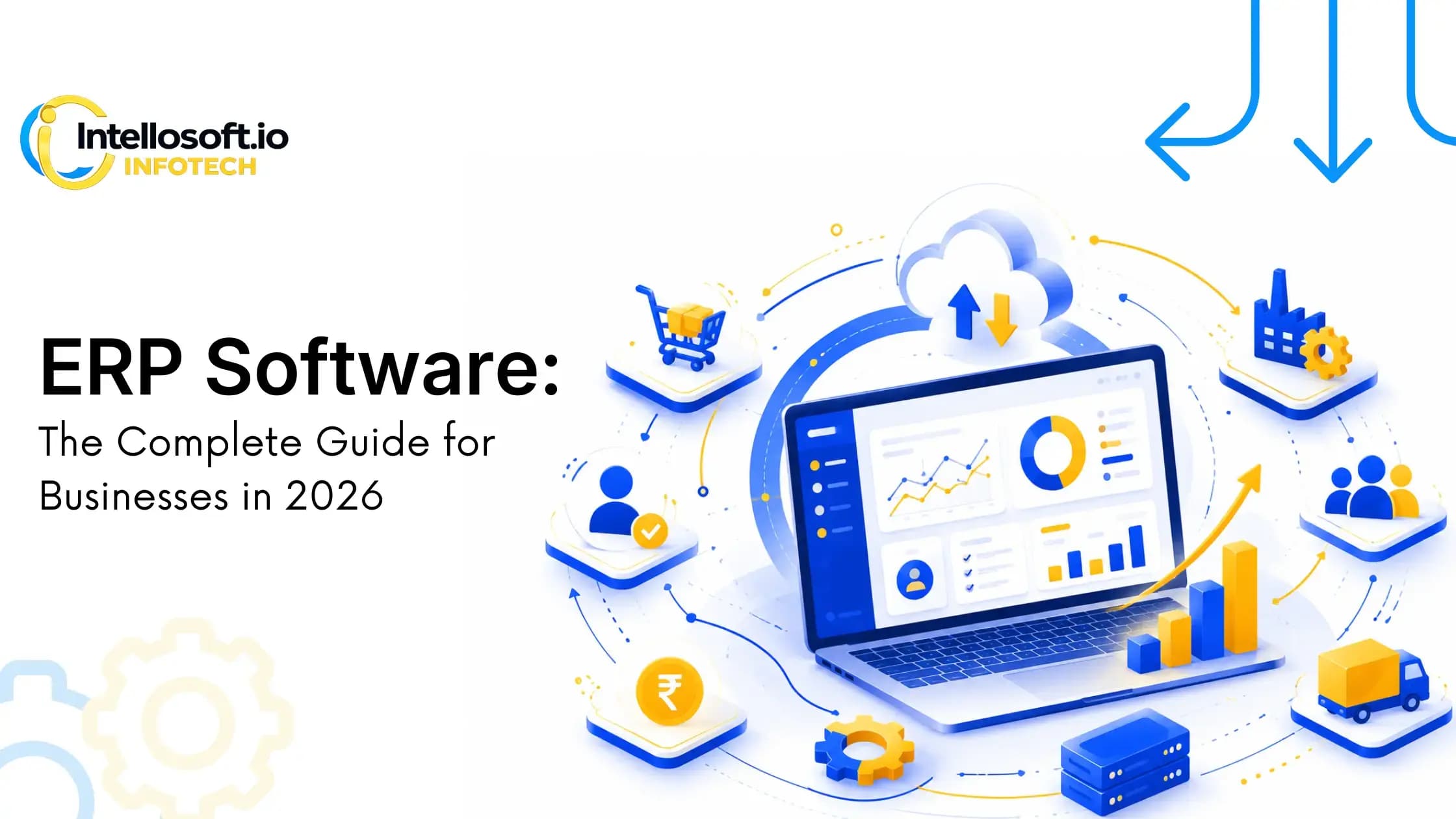
ERP Software: The Complete Guide for Businesses in 2026
Learn what ERP software is, how it works, key modules, benefits, implementation, costs, and how to choose the right ERP solution for your business in 2026.
Introduction
Running a business involves managing multiple departments, including finance, sales, procurement, inventory, production, human resources, and customer relationships. When these departments rely on separate software or spreadsheets, businesses often experience data inconsistencies, delayed decision-making, operational inefficiencies, and increased costs.
This is where ERP software (Enterprise Resource Planning software) becomes essential.
An ERP system brings all critical business operations into a centralized platform, allowing organizations to automate workflows, improve collaboration, gain real-time visibility into performance, and make informed business decisions. Whether you're a startup, a growing SME, or a large enterprise, the right ERP solution can significantly improve operational efficiency and prepare your business for future growth.
In recent years, businesses have also shifted toward Cloud ERP Solutions, AI-powered automation, and industry-specific ERP platforms that offer greater flexibility, scalability, and seamless integrations. Companies across manufacturing, healthcare, retail, logistics, education, and finance are adopting ERP systems to streamline operations and stay competitive.
What Is ERP Software?
Enterprise Resource Planning (ERP) software is an integrated business management system that connects various departments through a single centralized database. Instead of using different applications for accounting, inventory, procurement, sales, HR, manufacturing, and reporting, an ERP platform allows organizations to manage everything from one unified system.
Think of ERP software as the central nervous system of a business. Every department shares the same data, reducing duplication, improving collaboration, and ensuring everyone works with accurate, real-time information.
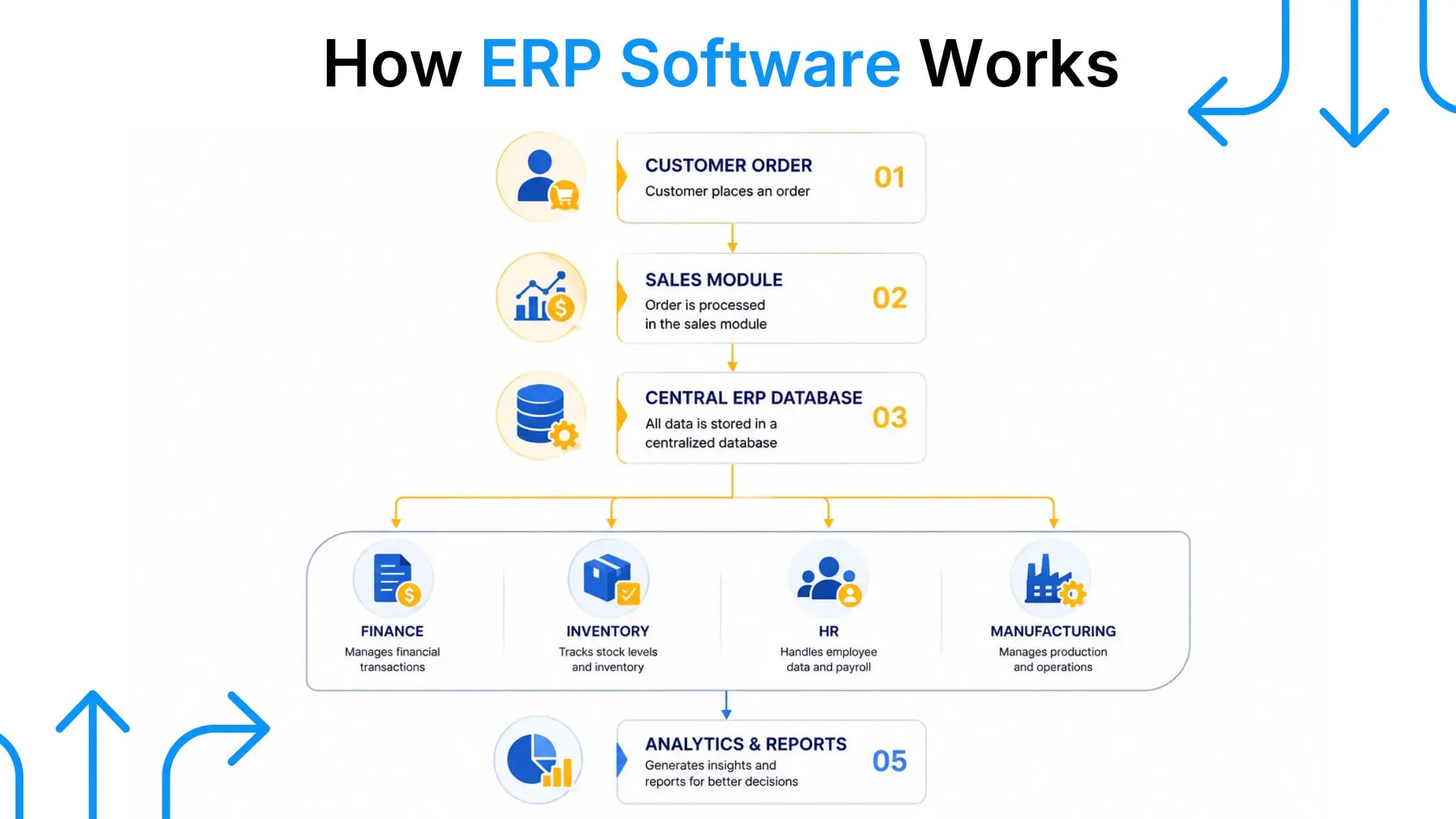
For example, when a customer places an order:
- The Sales team records the order
- Inventory is automatically updated
- Procurement receives replenishment alerts if stock is low
- Finance generates invoices
- Production schedules manufacturing if needed
- Management monitors everything through dashboards
All these processes occur within the same ERP system, eliminating manual work and reducing errors.
How ERP Software Works
A typical ERP system follows a centralized architecture where all departments access a shared database. This ensures that information entered by one department is instantly available to others.
This centralized approach helps organizations improve visibility, collaboration, and operational efficiency.
Core Characteristics of ERP Software
- Centralized database
- Automated workflows
- Real-time reporting
- Cross-department collaboration
- Role-based access control
- Business intelligence dashboards
- Integration with third-party applications
- Cloud and on-premise deployment options
- Scalable architecture
ERP at a Glance
| Feature | Description |
|---|---|
| Central Database | Stores all business data in one place |
| Automation | Eliminates repetitive manual tasks |
| Real-Time Reporting | Provides instant dashboards and analytics |
| Integration | Connects finance, HR, sales, inventory, and manufacturing |
| Scalability | Supports business growth without changing systems |
| Security | Role-based permissions and secure data management |
Why ERP Software Is Important in 2026
Today's businesses generate more operational data than ever before. Managing that data across disconnected tools creates bottlenecks and limits visibility. ERP software solves these challenges by creating a unified digital foundation that supports faster decisions, improved productivity, and long-term scalability.
Organizations are also investing in ERP because it enables:
- Better operational visibility
- Faster reporting
- AI-driven insights
- Automation of repetitive tasks
- Remote access through cloud platforms
- Easier compliance and audit readiness
As businesses continue their digital transformation journeys, ERP software has become a strategic investment rather than just an operational tool.
STILL MANAGING OPERATIONS ACROSS MULTIPLE SPREADSHEETS?
See how a custom ERP can simplify your workflows, improve visibility, and reduce manual effort.
Key Benefits of ERP Software
ERP software is much more than a technology investment—it transforms the way organizations operate by connecting departments, streamlining processes, and improving decision-making. Businesses that implement ERP often experience measurable improvements in productivity, collaboration, and operational efficiency.
Here are some of the biggest advantages:
1. Centralized Business Data
One of the biggest challenges organizations face is maintaining consistent data across departments. ERP eliminates duplicate records by storing information in a centralized database that everyone can access based on their permissions.
2. Improved Productivity
Manual data entry, repetitive approvals, and disconnected systems consume valuable time. ERP automates routine tasks, allowing employees to focus on strategic activities instead of administrative work.
3. Better Decision-Making
ERP systems provide real-time dashboards and customizable reports, giving managers instant access to key performance indicators (KPIs), financial metrics, inventory levels, and operational data.
4. Inventory Optimization
Businesses using Inventory Management ERP can monitor stock levels in real time, reduce overstocking, avoid shortages, and improve warehouse efficiency.
5. Stronger Financial Control
ERP centralizes financial operations, making budgeting, accounting, expense tracking, tax management, and reporting significantly easier.
6. Improved Supply Chain Visibility
A modern Supply Chain ERP enables organizations to track suppliers, purchase orders, shipments, inventory movement, and delivery timelines from a single platform.
7. Enhanced Procurement Management
With a dedicated Procurement ERP, businesses can automate purchase requests, vendor approvals, contract management, and procurement workflows.
8. Increased Customer Satisfaction
Because all departments work with the same information, businesses can process orders faster, reduce errors, improve communication, and deliver better customer experiences.
9. Business Scalability
As companies grow, ERP systems can expand by adding new users, locations, modules, or integrations without requiring a complete software replacement.
10. Better Compliance and Security
Modern ERP platforms include audit trails, permission controls, encryption, automated backups, and compliance features that help organizations meet regulatory requirements.
Common Business Challenges and How ERP Solves Them
| Business Challenge | ERP Solution |
|---|---|
| Manual spreadsheets | Workflow automation and centralized records |
| Data silos | Unified ERP database |
| Inventory inaccuracies | Inventory Management ERP with real-time stock tracking |
| Procurement delays | Automated Procurement ERP workflows |
| Supply chain inefficiencies | Integrated Supply Chain ERP |
| Financial reporting delays | Real-time dashboards and automated reports |
| Poor collaboration | Shared data across departments |
| Lack of business visibility | Centralized analytics and KPIs |
Core ERP Modules Explained
An ERP platform is made up of multiple functional modules, each designed to manage a specific business area. Organizations can implement only the modules they need or deploy a complete enterprise-wide ERP solution.
Finance & Accounting
The finance module manages:
- General ledger
- Accounts payable
- Accounts receivable
- Budgeting
- Tax calculations
- Financial reporting
For manufacturers, Manufacturing Finance ERP provides better visibility into production costs, operational expenses, and profitability.
Human Resources (HR)
HR modules help businesses manage:
- Employee records
- Attendance
- Payroll
- Leave management
- Performance reviews
- Recruitment
Inventory Management
An Inventory Management ERP tracks inventory movement across warehouses, retail stores, and manufacturing facilities while minimizing stock shortages and excess inventory.
Procurement
A Procurement ERP streamlines purchasing by managing vendor relationships, approvals, purchase orders, invoices, and procurement analytics.
Sales & CRM
The sales module tracks:
- Leads
- Quotations
- Customer orders
- Contracts
- Sales performance
When integrated with CRM capabilities, businesses gain a complete view of the customer lifecycle.
Supply Chain Management
A Supply Chain ERP improves visibility across procurement, logistics, warehouse management, transportation, and supplier operations, helping organizations optimize inventory flow and reduce delivery delays.
Manufacturing
Manufacturing businesses require advanced capabilities such as:
- Production planning
- Shop floor management
- Material planning
- Machine utilization
- Quality management
- Production scheduling
These functions are typically managed within a Manufacturing ERP System, enabling manufacturers to improve operational efficiency and reduce production bottlenecks.
Quality Management
Quality modules help organizations maintain product consistency through inspections, compliance checks, defect tracking, corrective actions, and quality reporting.
Types of ERP Systems
Not every business has the same operational needs, which is why ERP solutions are available in different deployment models. Choosing the right type depends on your budget, infrastructure, security requirements, and long-term growth plans.
Cloud ERP
Cloud ERP solutions are hosted by the software provider and accessed through the internet.
Advantages:
- Lower upfront investment
- Automatic updates
- Remote accessibility
- Faster implementation
- Easy scalability
Cloud ERP has become the preferred choice for businesses seeking flexibility and lower IT maintenance costs. Explore our cloud ERP development services to learn more.
On-Premise ERP
On-premise ERP is installed on the organization's own servers and managed internally.
It offers greater control over infrastructure and data but typically requires higher upfront investment, dedicated IT resources, and ongoing maintenance.
Hybrid ERP
Hybrid ERP combines cloud and on-premise deployments, allowing organizations to keep sensitive operations on local infrastructure while leveraging cloud services for scalability and remote access.
Cloud ERP vs On-Premise ERP
| Feature | Cloud ERP Solutions | On-Premise ERP |
|---|---|---|
| Initial Cost | Lower | Higher |
| Maintenance | Vendor-managed | In-house IT |
| Scalability | Excellent | Moderate |
| Remote Access | Available anywhere | Limited |
| Software Updates | Automatic | Manual |
| Deployment Speed | Faster | Slower |
| Infrastructure | No local servers required | Dedicated hardware needed |
Cloud ERP continues to gain popularity because it reduces infrastructure costs while supporting remote teams, business expansion, and seamless software updates.
ERP for the Manufacturing Industry
Manufacturing businesses operate in a highly dynamic environment where production schedules, inventory levels, supplier coordination, quality control, and customer demand must work together seamlessly. Managing these processes through spreadsheets or disconnected software often leads to production delays, inventory inaccuracies, and higher operational costs.
A Manufacturing ERP System integrates every stage of the manufacturing lifecycle into a single platform, providing real-time visibility and control over operations.
Whether you're a small factory or a large enterprise, Manufacturing ERP Development Services can help automate production planning, optimize inventory, improve quality management, and enhance overall efficiency.
How ERP Transforms Manufacturing Operations
A modern manufacturing ERP solution connects:
- Production Planning
- Inventory Management
- Procurement
- Finance
- Warehouse Management
- Supply Chain
- Quality Control
- Sales & Distribution
This unified approach helps businesses reduce manual work while improving productivity and decision-making.
Common Manufacturing ERP Capabilities
- Production Planning Software for scheduling manufacturing activities
- Inventory Management ERP to monitor raw materials and finished goods
- Supply Chain ERP for supplier and logistics coordination
- Procurement ERP for vendor and purchase order management
- Quality Management ERP for inspections and compliance
- Manufacturing Finance ERP for production costing and financial reporting
- Demand Forecasting Software for predicting customer demand
- Shop Floor Management Software for real-time production tracking
- Manufacturing Process Automation to eliminate repetitive tasks
- Production Management Software for monitoring production performance
Many organizations also invest in Custom Manufacturing ERP Development to match their unique workflows instead of adapting their operations to generic software.
Industry-specific ERP solutions are increasingly common for sectors such as:
- Automotive Manufacturing ERP
- Electronics Manufacturing ERP
- Food & Beverage ERP
- Pharmaceutical Manufacturing ERP
- Textile Manufacturing ERP
Businesses with legacy systems often choose Manufacturing ERP Modernization to upgrade outdated software, improve performance, and support cloud-based operations.
EVERY MANUFACTURING BUSINESS HAS UNIQUE WORKFLOWS. YOUR ERP SHOULD REFLECT THEM.
Schedule a Free ERP Consultation
ERP Implementation Process
An ERP implementation is not simply installing software—it is a business transformation project. Proper planning ensures minimal disruption and higher adoption across the organization.
Typical ERP Implementation Steps
| Phase | Objective |
|---|---|
| Requirement Analysis | Understand business processes and goals |
| Planning | Define scope, budget, and implementation timeline |
| Solution Design | Configure workflows and system architecture |
| Development & Customization | Build custom features and integrations |
| Data Migration | Transfer existing business data securely |
| Testing | Validate system functionality and performance |
| User Training | Prepare employees for adoption |
| Deployment | Launch the ERP system |
| Ongoing Support | Monitor performance and continuous improvements |
Common Implementation Challenges
Organizations may encounter:
- Poor planning
- Resistance to change
- Incomplete data migration
- Lack of employee training
- Integration issues
- Scope changes during implementation
Working with an experienced ERP development partner significantly reduces these risks while ensuring a smoother rollout.
ERP Integration: Connecting Your Business Systems
An ERP system becomes even more valuable when it integrates with the tools your business already uses.
Common ERP integrations include:
- CRM platforms
- HRMS software
- Accounting software
- E-commerce platforms
- Payment gateways
- Business Intelligence tools
- Warehouse Management Systems (WMS)
- IoT devices
- Manufacturing Execution Systems (MES)
For manufacturers, Manufacturing ERP Integration enables real-time communication between production equipment, inventory systems, and business applications.
Many factories also benefit from ERP MES Integration, which connects production-floor activities directly with enterprise operations, improving visibility, reducing downtime, and enhancing production efficiency.
PLANNING TO MODERNIZE YOUR BUSINESS SYSTEMS?
Our ERP specialists can integrate your ERP platform with CRM, accounting, HR, MES, and third-party applications to create a connected digital ecosystem.
How Much Does ERP Software Development Cost?
One of the most common questions businesses ask is: "How much does ERP software cost?"
The answer depends on several factors because every organization has different operational requirements.
Factors Affecting ERP Development Cost
- Number of users
- Required ERP modules
- Customization level
- Cloud or on-premise deployment
- Third-party integrations
- Mobile application requirements
- Reporting and dashboards
- Security and compliance needs
- Data migration complexity
- Ongoing maintenance and support
A simple ERP system for a growing business requires significantly less investment than a fully customized enterprise platform with advanced manufacturing, AI, and analytics capabilities.
Instead of focusing solely on development cost, businesses should evaluate the long-term return on investment through improved productivity, reduced manual work, lower operational costs, and better decision-making.
How to Choose the Right ERP Software
Selecting an ERP solution is a long-term business decision. The right platform should support your current operations while remaining flexible enough for future growth.
ERP Selection Checklist
- Understand your business goals
- Identify current operational challenges
- Choose industry-specific functionality
- Evaluate scalability
- Review integration capabilities
- Prioritize data security
- Consider customization requirements
- Assess vendor expertise
- Check implementation and support services
- Calculate total cost of ownership instead of only initial cost
Businesses in manufacturing should ensure the ERP platform supports production planning, procurement, inventory, quality management, and shop-floor operations.
Custom ERP vs Off-the-Shelf ERP
| Custom ERP | Off-the-Shelf ERP |
|---|---|
| Built around your workflows | Generic workflows |
| Flexible customization | Limited customization |
| Easier integration with existing systems | Integration limitations |
| Scales with business growth | May require switching platforms later |
| Competitive business advantage | Standard functionality |
| Higher initial investment | Lower upfront cost |
For organizations with unique workflows, multiple departments, or specialized manufacturing processes, custom ERP software often delivers greater long-term value. Explore our custom ERP development services to learn more.
Future Trends in ERP Software
ERP technology continues to evolve as businesses adopt digital transformation initiatives.
Key ERP trends include:
- Artificial Intelligence (AI)
- Predictive analytics
- Low-code customization
- Cloud-native ERP platforms
- Internet of Things (IoT) integration
- Advanced cybersecurity
- Workflow automation
- Real-time business intelligence
- Mobile-first ERP applications
- Sustainability reporting and ESG dashboards
Businesses investing in modern ERP platforms today are better positioned to adapt to changing market conditions and customer expectations.
Conclusion
ERP software has evolved from a back-office management tool into the digital foundation of modern businesses. By centralizing data, automating workflows, and connecting every department, ERP systems help organizations improve efficiency, reduce operational costs, and make faster, data-driven decisions.
Whether you're a growing business looking to replace spreadsheets or a manufacturer planning to modernize production processes, choosing the right ERP solution is a strategic investment. Features such as Inventory Management ERP, Supply Chain ERP, Procurement ERP, Manufacturing ERP Integration, and Cloud ERP Solutions enable businesses to scale with confidence while remaining agile in a competitive market.
If your organization requires industry-specific workflows, seamless integrations, or advanced manufacturing capabilities, investing in a custom ERP solution can deliver long-term operational and financial benefits.
Ready to Build a Future-Ready ERP Solution?
Whether you need a custom enterprise platform, a cloud-based ERP system, or a modern Manufacturing ERP Solution, Intellosoft Infotech can help you design, develop, and implement an ERP platform tailored to your business goals.
Get in touch with our ERP experts today to discuss your project and discover how a customized ERP solution can accelerate your digital transformation.
Key Takeaways
ERP software has become the digital backbone of modern businesses, enabling organizations to centralize data, automate workflows, and improve cross-department collaboration.
- ERP systems connect finance, inventory, procurement, HR, manufacturing, and sales on a single platform
- Cloud ERP solutions offer lower upfront costs, automatic updates, and remote accessibility
- Manufacturing businesses benefit from specialized ERP capabilities for production planning and quality control
- Custom ERP development delivers greater long-term value for organizations with unique workflows
- Successful ERP implementation requires proper planning, user training, and ongoing support
- Future ERP trends include AI, predictive analytics, IoT integration, and low-code customization